Mirte Lab Cleaner Documentation
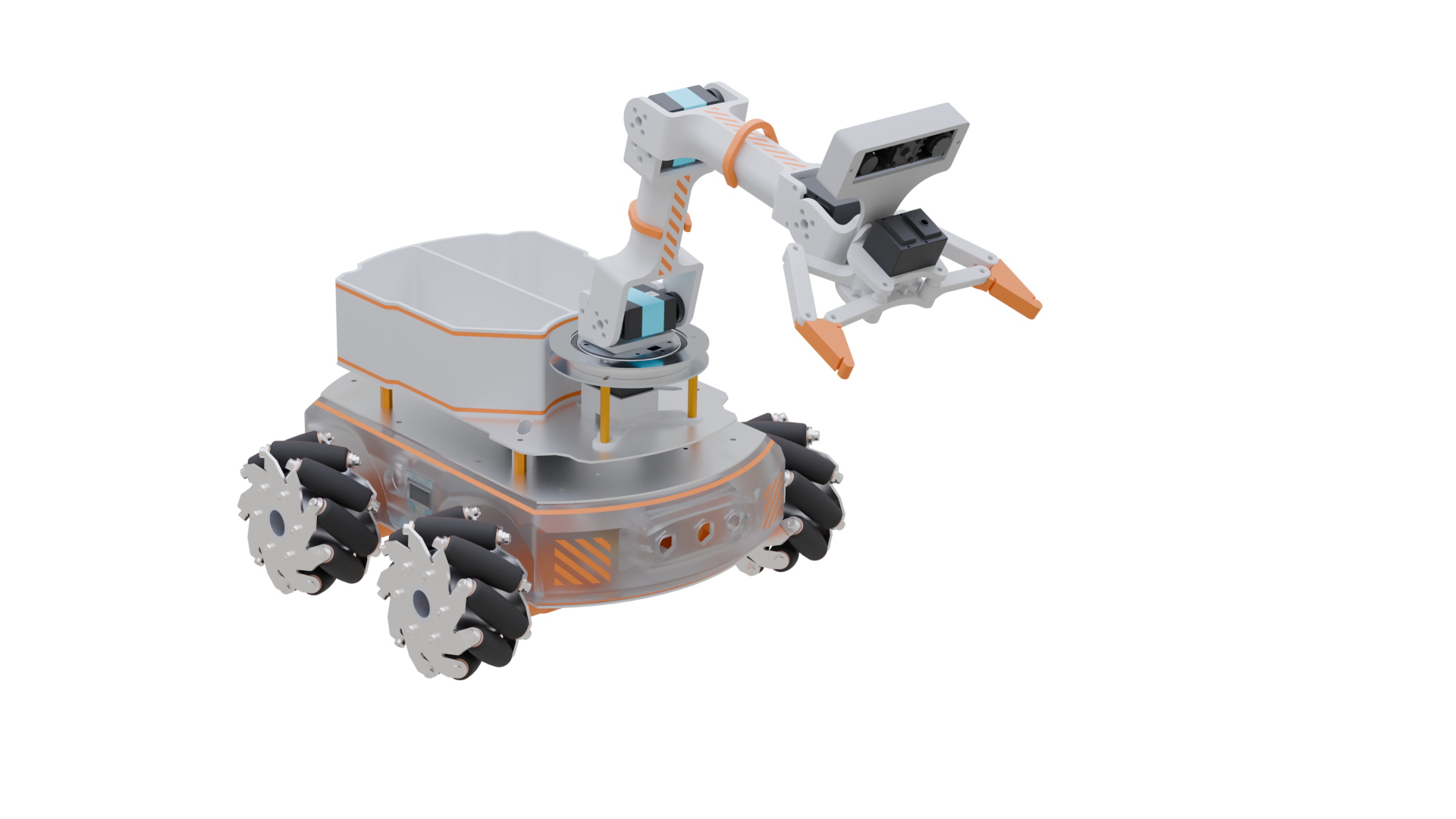

The Mirte Master Lab Cleanup Robot is an autonomous mobile manipulator designed to identify, retrieve, and sort objects in a laboratory environment without human intervention. The system combines frontier-based exploration, coverage path planning, 3D object detection, and colour-based classification to fully automate the lab cleaning task.
The robot platform is the Mirte Master, a mechanum-drive mobile robot with a 4-DOF arm and 5-bar-linkage gripper. It uses an gripper-mounted Orbbec Astra depth camera for 3D perception and 2D classification. Navigation is handled by the ROS 2 Nav2 stack, motion planning by MoveIt 2, and task coordination by a py_trees behaviour tree.
Package Documentation
This is the top-level documentation for the mirte_lc ROS 2 project. Each ROS 2 package has its own API documentation:
Package |
Description |
|---|---|
Gazebo simulation worlds and launch files |
|
Main behaviour tree and lab cleaning logic |
|
MoveIt C++ action server for arm control |
|
Custom ROS 2 message, service, and action definitions |
|
Nav2 coverage navigation and frontier-based exploration |
|
Object detection and 3D localisation via YOLO + point cloud |
The system is composed of eleven ROS 2 nodes that communicate through topics, services, and actions. The nodes are organised into four functional layers: navigation, manipulation, perception, and task coordination.
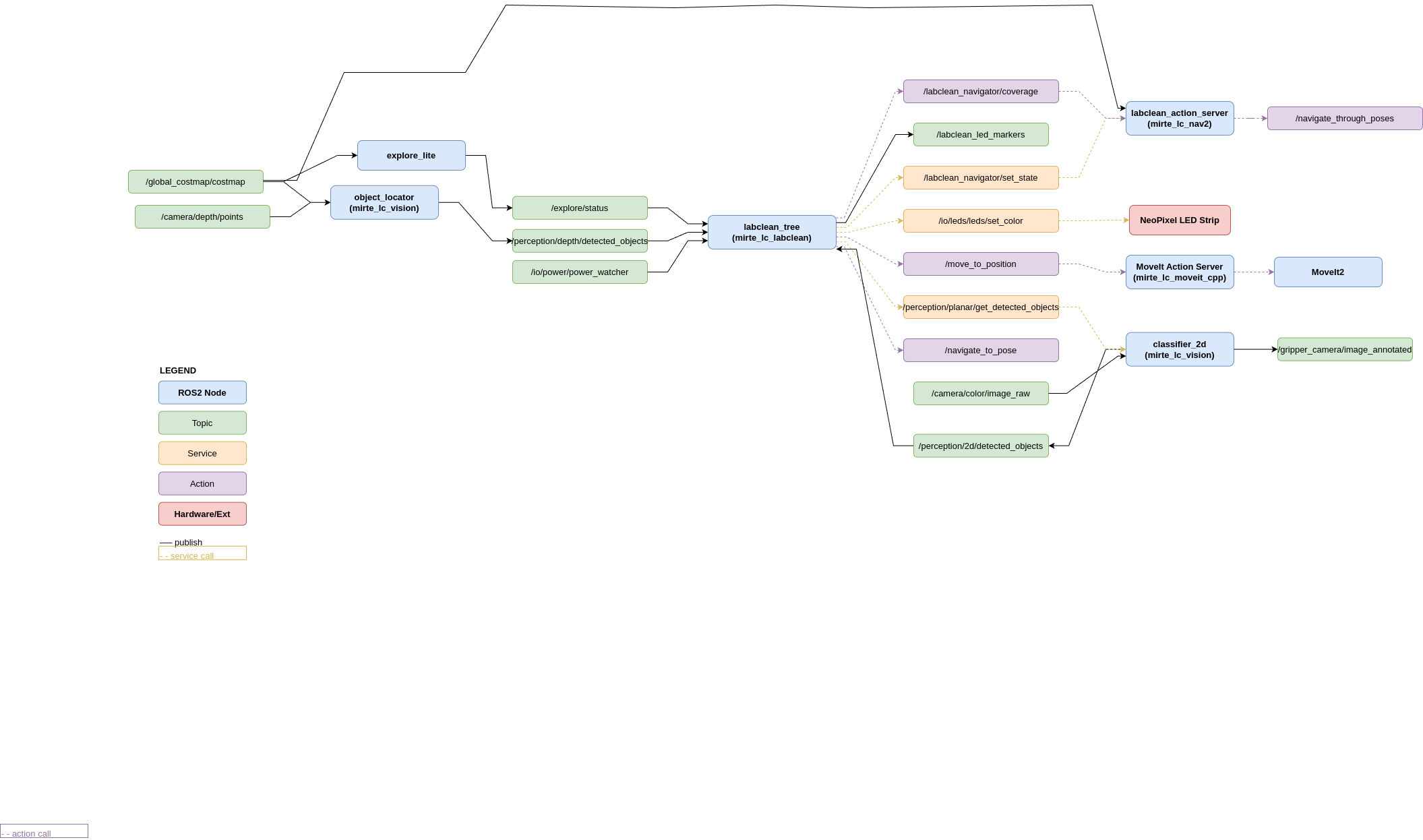
Key interfaces between nodes:
Interface |
Type |
Kind |
Between |
|---|---|---|---|
|
|
Topic |
|
|
|
Action |
|
|
|
Service |
|
|
|
Action |
|
|
|
Action |
|
|
|
Action |
|
|
|
Service |
|
|
|
Topic |
Nav2 → |
|
battery msg |
Topic |
Hardware → |
|
|
Topic |
|
Quickstart
Clone and build the full workspace:
cd ~/ros2_ws/src
git clone https://github.com/matt-rbt/Mirte_Lab_Clean
cd ~/ros2_ws
vcs import src/ < src/mirte_lc/sources.repos
cd src/mirte-ros-packages && git submodule update --init --recursive && cd ../..
rosdep install -y --from-paths src/ --ignore-src --rosdistro humble
colcon build --symlink-install
Launch the full stack on the real robot:
ros2 launch mirte_lc_labclean labclean_bringup.launch.py use_sim_time:=false
Launch in simulation:
# Terminal 1 — Gazebo
ros2 launch mirte_lc_gazebo gazebo_mirte_lc.launch.py

# Terminal 2 — full stack
ros2 launch mirte_lc_labclean labclean_bringup.launch.py use_sim_time:=true
See quickstart for the full installation guide including robot-only sparse checkout, clock synchronisation, and visualisation setup.
ROS 2 requires the clocks on the robot and the development laptop to be synchronised to within ~1 ms for TF and sensor fusion to work correctly. Chrony is used to sync the laptop to the robot:
On the robot — add to /etc/chrony/chrony.conf:
local stratum 8
allow 192.168.178.0/24
allow 192.168.42.0/24
On the laptop — add to /etc/chrony/chrony.conf:
server 192.168.42.148 iburst prefer
server 192.168.178.38 iburst
makestep 1.0 3
Verify synchronisation:
chronyc sources -v
# 192.168.x.x should show ^* (current best source)